
The dashboard says busy. The client asks so what?
Your team sent more texts this week. Good news, right? Maybe. If most of those texts were appointment reminders, you learned something about reminders. You still don’t know whether the people asking about a quote got an answer.
That’s the useful split in GoHighLevel communication activity reporting: a dashboard can show where activity changed. The conversation or call record tells you whether a particular person got the help they needed.
Here’s how to make that distinction useful on a client call instead of reading the message count out loud and hoping nobody asks a follow-up question.
Start with the channel and direction
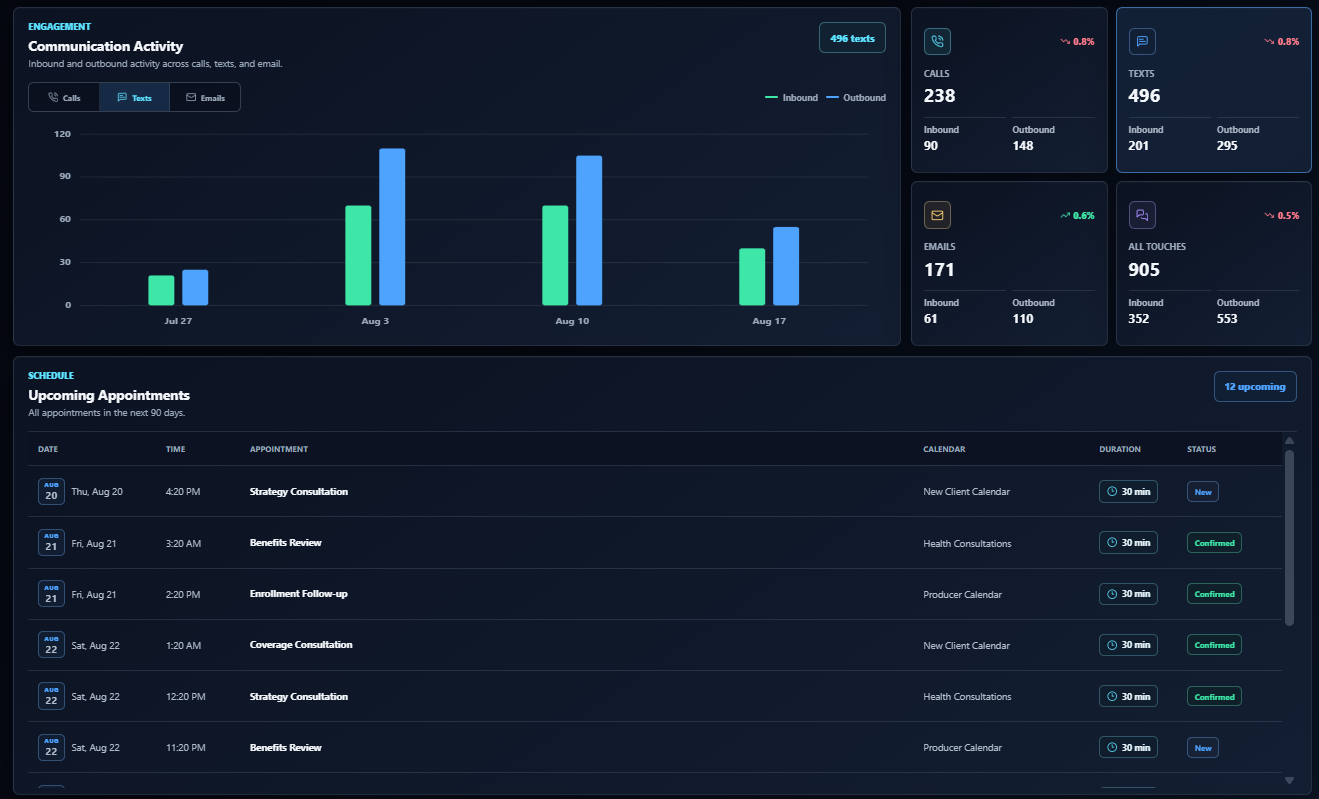
The flagship Agency Dash Pro dashboard has a Communication Activity panel for calls, texts, and email. Select a channel and look at inbound and outbound activity over the same reporting period. The trend can tell you which week to investigate instead of making you open an entire month of conversations.
In the preview below, Texts is selected and the panel shows 496 texts. The bars separate incoming from outgoing activity. If you see a similar jump in a live account, check what changed that week: a campaign went out, a reminder sequence started, or more people wrote in. The chart alone can’t tell you which explanation is right.
Start with a comparison that makes sense: the same account, same channel, and comparable time windows. Don’t compare a whole week with two days of the current week and call it a drop.
Inbound divided by outbound is not a reply rate
The same preview shows 201 inbound texts and 295 outbound texts. Don’t divide one by the other and put a reply-rate label on it. A person might send three messages in one thread. Some incoming messages aren’t replies to the outreach you’re measuring, and some outgoing texts may go to the same person.
For one outreach campaign, decide up front what counts: for example, unique recipients with a delivered first message, and how many of those people give a qualifying reply within seven days. Say whether an opt-out counts as a reply and keep the recipient group the same on both sides.
Here’s hypothetical math, separate from the screenshot: 12 qualifying replies from 40 unique recipients in the agreed window is 30%. The point isn’t the percentage. It’s that you know which people and which replies went into it.
Separate an automated touch from a team reply
An instant acknowledgment can be useful. It’s just not the same as someone answering a question about pricing. If the client wants to know how quickly a person responded, define that before you measure anything.
Pick a handful of new threads. Record when the relevant inquiry arrived and when the first qualifying human response went out. Decide how to handle after-hours inquiries, unanswered threads, and automated confirmations. Report how many threads had no qualifying reply instead of quietly dropping them from the review.
If you’re tracking this in HighLevel, the User Replied trigger is one input. HighLevel says it fires on delivered messages sent by a team member from Conversations, including new outbound messages, but not workflow or Conversation AI messages. You still need to match the event to the right inquiry; the trigger alone doesn’t tell you that the client’s question was answered.
For calls, check what happened after the ring
The Calls card shows 90 inbound and 148 outbound in this preview. That’s useful for deciding where to look. It doesn’t tell you how many calls were answered or whether a missed caller received a callback.
Where the account has access, use HighLevel’s Call Reporting to check outcomes and individual records for the relevant number and period. If several inbound calls went unanswered, sample those records and see what happened next. For example, did someone call back, did a text acknowledgment go out, and was a human follow-up still needed?
Keep the original call and the follow-up separate. A high outbound count by itself can’t establish that the team returned those specific missed calls.
End the check-in with one thing to investigate
If inbound texts rose but bookings stayed flat, don’t tell the client that texts aren’t working. Pull a small sample first. Were the inquiries answered? Were they asking about the service you expected? Did people get a clear next step? Compare the reporting periods before drawing conclusions from the appointment numbers.
Then give the client one observation, one question, and one next step. For example: outbound texts rose during reminder week; we don’t yet know whether new inquiries got faster replies; we’ll review the first response in a sample of new threads. That’s more useful than promising to send even more texts next month.
Our guide to seven client dashboard metrics puts communication activity alongside leads, appointments, and pipeline. Use the dashboard to find the change worth discussing. Use the underlying records to decide what to do about it.